The Ultimate Fibonacci Trading Course
Master Fibonacci retracements and extensions to find high-probability entry points.
Last Updated: January 4, 2026 • Verified: All steps and features tested on current Bybit platform
Bybit is a leading cryptocurrency exchange where you can buy, sell, and trade crypto with spot and futures markets. To start trading in 2026: create an account using a referral code for bonuses, complete KYC verification (under 5 minutes), deposit funds via card or bank transfer, then place your first trade in the spot market. This guide covers every step from signup to advanced futures trading.
📺 Follow along with the video as you set up your account, or bookmark this page and use the written guide.
Complete these 6 steps to start trading:
New Bybit users can claim up to $30,000 in bonuses by using referral code 88512 during signup (80%+ of users receive at least $100)
KYC verification takes under 5 minutes and unlocks all trading features—complete Level 1 with a photo ID and facial recognition
Four deposit methods available: one-click card purchase (instant), bank transfer (lowest fees), crypto deposit, and P2P trading (zero fees)
Start with spot trading to buy real cryptocurrency before exploring futures trading with leverage
Always transfer funds from your Funding account to Unified Trading account before placing trades
Use stop-losses on every trade and keep leverage low (2-5x) until you develop consistent profitability
💡 Click any timestamp to jump to that section in the article.
Use referral code 88512 when signing up to unlock trading rewards. Over 80% of new users receive at least $100 in bonuses.
Bybit is one of the world's largest cryptocurrency exchanges, serving millions of traders globally. Whether your goal is to make $50, $100, or even $1,000 a day trading crypto, Bybit provides the tools you need to get started.
In 2026, Bybit remains a top choice for both beginners and experienced traders because of its user-friendly interface, competitive fees, and comprehensive feature set. The platform supports spot trading for real cryptocurrency, futures trading with up to 100x leverage, and a variety of deposit methods including bank transfers, credit cards, and peer-to-peer trading.
This guide walks you through everything from creating your account to placing your first trade—and even covers intermediate concepts like futures trading and technical analysis.
"I have been into trading for over 5 years now and I have made every mistake in the book so you guys don't have to."
Creating a Bybit account takes just a few minutes. Here's exactly how to do it:
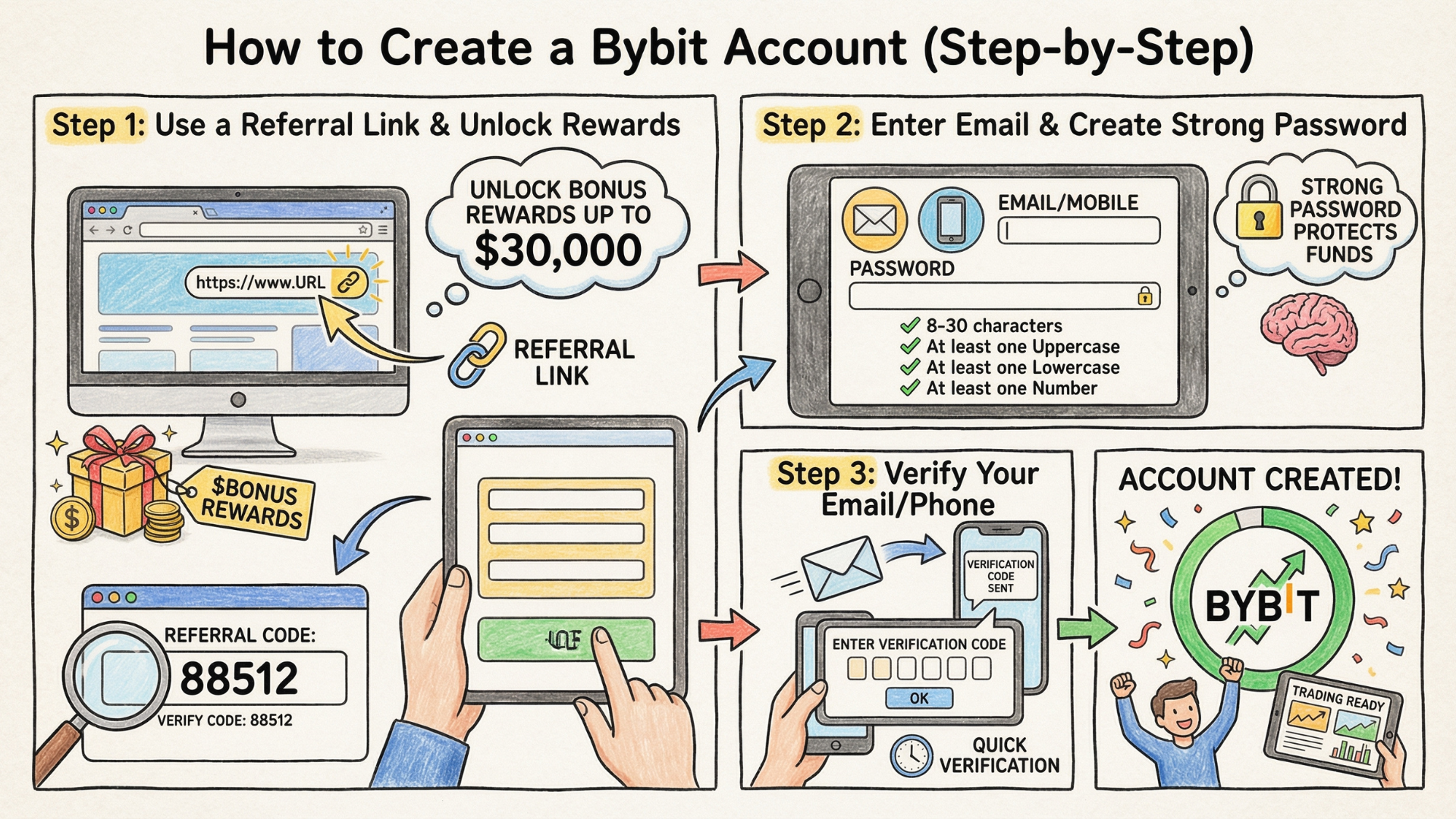
How to Create a Bybit Account Step-by-Step (2026)
Before signing up, make sure you use a referral link to unlock bonus rewards. New users can receive up to $30,000 in bonuses based on their trading activity.
Important: After clicking the signup link, verify you see the referral code 88512 displayed on the registration page. If it's not visible, enter it manually in the referral code box.
You can register using either your email address or mobile number. When creating your password, Bybit requires:
8 to 30 characters
At least one uppercase letter
At least one lowercase letter
At least one number
Choose a strong, unique password from the start—this protects your funds and makes your account more secure.
After submitting the registration form, Bybit sends a verification code to your email or phone. Enter this code to complete the initial signup process.
KYC stands for "Know Your Customer"—it's a standard verification process that Bybit uses to improve security and prevent fraud. You must complete KYC before you can trade or deposit funds.
Level 1 verification requires two steps:
Identity Document: Submit a government-issued ID such as a driver's license, passport, or national ID card
Facial Recognition: Complete a quick selfie verification to confirm your identity
The entire process typically takes under 5 minutes when using the mobile app. Once approved, you'll see "Identity Verification Level 1" displayed under your account name.
Level 2 verification unlocks higher withdrawal limits and additional features. To complete it, submit proof of address using one of these documents:
Bank statement
Utility bill (electricity, water, internet)
Tax return
Government correspondence
The document must show your name and address matching your account information.
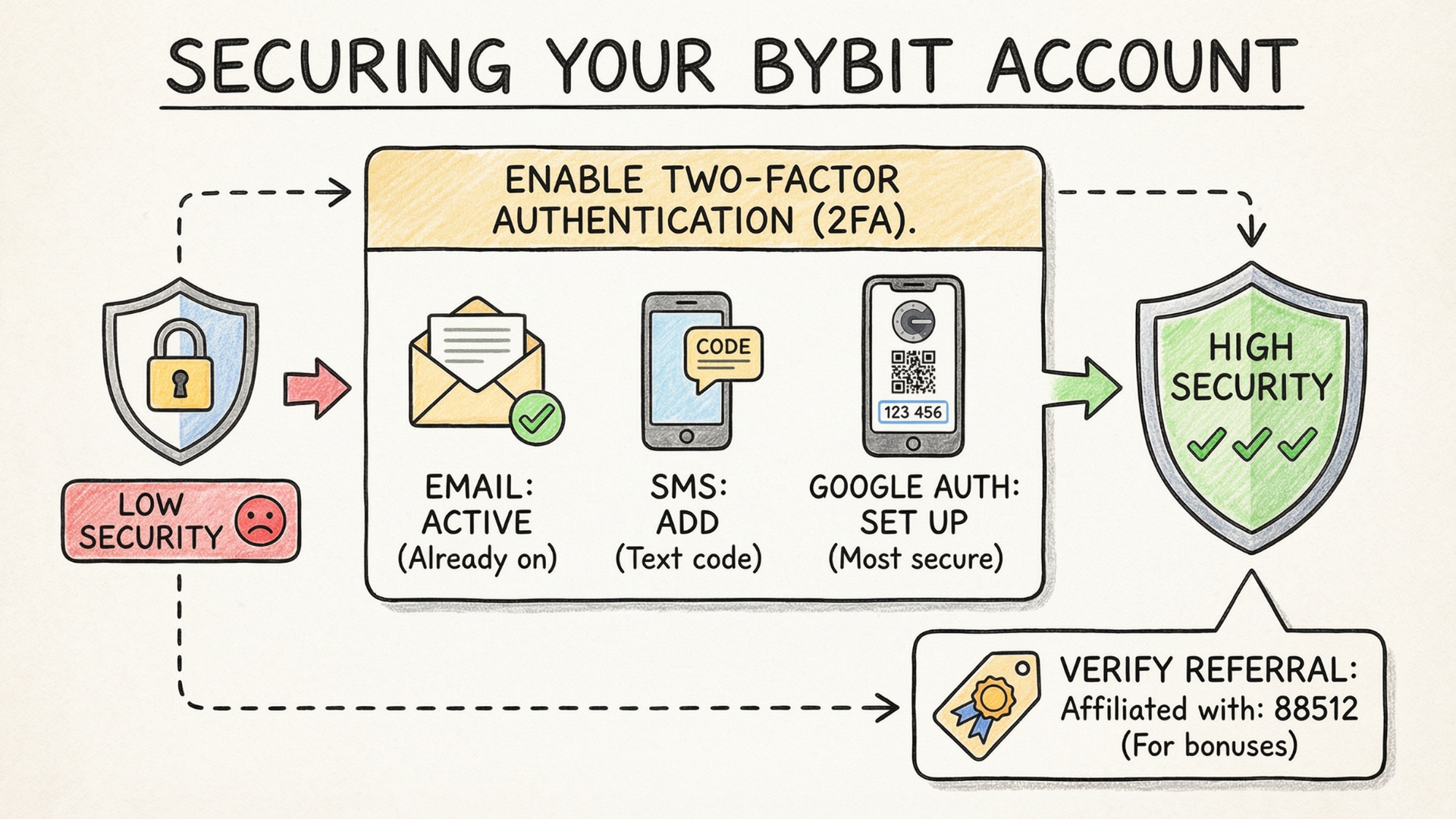
Upgrade from low to high security by enabling email, SMS, and Google Authenticator 2FA on your Bybit account.
After creating your account, you may notice your security level shows as "Low." Here's how to upgrade to maximum security:
Navigate to Profile → Security and enable these authentication methods:
Email Verification: Already active if you registered with email
SMS Authentication: Adds a text message code requirement for logins
Google Authenticator: The most secure option—generates time-based codes that refresh every 30 seconds
To set up Google Authenticator:
Download the Google Authenticator app on your phone
Scan the QR code shown in Bybit
Enter the 6-digit code to confirm setup
With all three methods enabled, your security level changes to "High."
While in your account settings, confirm that "Affiliated with: 88512" appears in your account info. This ensures you're eligible for trading bonuses.
Bybit offers several deposit methods, each with different fees and processing times.
Choose the best method for your situation:
The quickest way to add funds is through the One-Click Buy feature:
Go to Buy Crypto → One-Click Buy
Select your currency (EUR, USD, GBP, etc.)
Enter the amount you want to deposit
Choose your payment method: Apple Pay, Google Pay, or bank card
Complete the purchase
Funds arrive instantly, though card fees are slightly higher than bank transfers.
For lower fees, use a direct bank transfer:
Go to Buy Crypto → Fiat Deposit
Select your currency and amount
Choose SEPA (or your regional bank transfer option)
Copy the provided bank details
Send the transfer from your bank
Bank transfers typically take 1-3 business days but charge significantly lower fees (around €2 per €1,000).
Critical Note: Your bank account name must match your Bybit KYC information exactly. Avoid mentioning cryptocurrency in the transfer reference—some banks flag crypto-related transactions.
If you already own cryptocurrency on another exchange:
Go to Buy Crypto → Crypto Deposit
Select the cryptocurrency you want to deposit
Choose the correct network (this must match the sending exchange)
Copy your deposit address
Send from your other exchange to this address
Warning: Always verify the network matches on both exchanges. Sending crypto on the wrong network can result in permanent loss of funds.
Peer-to-peer trading lets you buy crypto directly from other Bybit users with zero platform fees:
Go to Buy Crypto → P2P Trading
Browse available sellers
Select a seller with good ratings and competitive prices
Complete the transaction using their accepted payment method
P2P trading is particularly useful in regions with limited fiat deposit options.
Bybit uses two main account types that you need to understand before trading:
Your Funding Account holds deposits and withdrawals. When you first add money to Bybit, it appears here.
Your Unified Trading Account is where you actually trade. You must transfer funds from Funding to Unified Trading before placing any trades.
Click the Transfer button in the upper right corner
Select From: Funding and To: Unified Trading
Click "All" to transfer your entire balance, or enter a specific amount
Click Confirm
The transfer happens instantly. You can verify by checking Assets → Unified Trading to see your available balance.
The easiest way to swap one cryptocurrency for another is using Bybit's Convert feature:
Go to Buy Crypto → Convert
Select the cryptocurrency you want to spend (e.g., USDT)
Select the cryptocurrency you want to receive (e.g., BTC)
Enter the amount or click "All"
Click Get a Quote
Confirm within the countdown timer
Conversions execute at current market rates with minimal slippage. This is the simplest trading method—perfect for beginners who just want to buy and hold cryptocurrency.
The Spot Market is where you buy and sell real cryptocurrency. When you purchase Bitcoin on the spot market, you own actual Bitcoin.
Click Trade → Spot in the main navigation
Select your trading pair (e.g., BTC/USDT)
The trading interface opens with charts, order book, and trading panel
Bybit displays candlestick charts by default. Each candle represents a specific time period:
Green candles: Price increased during that period
Red candles: Price decreased during that period
Candle body: Shows the open and close prices
Wicks (thin lines): Show the highest and lowest prices reached
You can change timeframes using the buttons above the chart (1m, 5m, 15m, 1H, 4H, 1D, 1W).
The order book shows all pending buy and sell orders:
Red orders (top): Sellers waiting to sell at specific prices
Green orders (bottom): Buyers waiting to buy at specific prices
Quantity column: Shows how much is being bought or sold at each price
The order book updates in real-time as traders place and cancel orders.
Bybit offers several order types for different trading strategies.
A market order executes immediately at the best available price:
Select Market in the order panel
Choose Buy or Sell
Enter the amount or use the slider (25%, 50%, 75%, 100%)
Click Buy BTC (or your selected asset)
Market orders guarantee execution but not price—useful when you need to enter or exit quickly.
A limit order lets you specify the exact price for your trade:
Select Limit in the order panel
Enter your desired price in the Order Price field
Enter the amount you want to trade
Click Buy or Sell
For buy limits, set a price below the current market price. For sell limits, set a price above. The order remains open until filled or cancelled.
TP/SL orders automatically close your position when price reaches specified levels:
Select TP/SL in the order panel
Set your Trigger Price (the price that activates the order)
Choose Limit or Market for execution type
Select the quantity to sell
Confirm the order
Always use stop-losses to protect your capital. A common approach is placing stops below recent support levels.
Futures trading lets you trade contracts based on cryptocurrency prices rather than the actual assets. The key advantage is leverage—the ability to control larger positions with less capital.
FeatureSpot TradingFutures TradingWhat you tradeReal cryptocurrencyPrice contractsLeverageNone (1x)Up to 100xCan profit from drops?NoYes (short selling)Risk levelLowerHigher
Leverage multiplies both profits and losses. With 5x leverage:
A 2% price increase = 10% profit
A 2% price decrease = 10% loss
Higher leverage means higher risk. Beginners should start with low leverage (2-5x) until they understand the mechanics.
See how leverage amplifies both gains and losses:
Every leveraged position has a liquidation price—the point where your position is automatically closed to prevent further losses. This appears when you place a futures order.
Critical Rule: Always set your stop-loss above your liquidation price. If your stop-loss is below the liquidation price, your position will be forcibly closed before your stop triggers.
Here's a step-by-step walkthrough of opening a futures position:
Go to Trade → Futures
Select your trading pair (e.g., BTCUSDT)
Set your leverage using the slider (start with 5x or less)
Choose Market or Limit order type
Enter your position size
(Optional) Check the TP/SL box and set levels
Click Buy/Long (betting price goes up) or Sell/Short (betting price goes down)
Review the confirmation window—especially the estimated liquidation price
Confirm the trade
Your active futures positions appear in the Positions tab below the chart. Here you can:
Monitor unrealized profit/loss
View entry price and liquidation price
Add or modify take-profit/stop-loss levels
Close all or part of the position
To exit a position:
Go to the Positions tab
Find your open position
Click Close by and select Market (instant) or Limit (specific price)
Choose the percentage to close (100% for full exit)
Confirm the close
Technical analysis helps you identify potential entry and exit points by studying price charts. Here are the essential tools available on Bybit.
Click the full-screen button (two arrows icon) to enlarge the chart for better analysis.
Trend lines help identify market direction:
Click the Trend Line Tools icon (upper left)
Select Trend Line
Click on a starting point (swing low in an uptrend)
Drag to an ending point (another swing low)
Copy the line (Ctrl+C, Ctrl+V) to create parallel channels
Breakouts above resistance trend lines often signal buying opportunities.
Chart patterns like the bullish flag can signal continuation moves:
Flag pole: A strong price move in one direction
Flag: A consolidating range that slopes against the prior move
Breakout: When price exits the flag in the original direction
The video example shows a textbook bullish flag that led to a significant upward move after breaking resistance.
The volume indicator (bars below the chart) shows trading activity:
Tall bars: High trading activity during that period
Short bars: Low trading activity
Volume on breakouts: Breakouts with high volume are more significant
To customize volume display, click the settings cog and disable the moving average line for cleaner visualization.
MACD (Moving Average Convergence Divergence) helps identify momentum shifts:
Click Indicators at the top of the chart
Search for "MACD" and add it
The indicator appears below the price chart
Default settings work well, but for faster signals, try: Fast Length: 3, Slow Length: 10, Signal: 16.
Strong momentum spikes on MACD often precede pullbacks—potential entry opportunities for trend continuation trades.
Fibonacci retracement levels help predict where pullbacks may reverse:
Select Fibonacci Tools → Fib Retracement
In an uptrend, click from the swing low to the swing high
Key levels appear: 0.382, 0.5, 0.618
Most healthy pullbacks reverse somewhere between the 0.382 and 0.618 levels. The 0.5 level (50% retracement) is particularly significant.
No technical analysis tool guarantees profitable trades. Protect your capital with these principles:
Always use stop-losses: Every trade should have a predetermined exit point
Set realistic profit targets: Use take-profit orders to lock in gains
Size positions appropriately: Never risk more than 1-2% of your account on a single trade
Start with spot trading: Master the basics before using leverage
Use low leverage initially: If trading futures, start with 2-5x until you're consistently profitable
Keep a trading journal: Track your decisions to identify patterns in your winning and losing trades
You now have everything you need to start trading on Bybit. Here's the recommended progression:
Create your account using the bonus link to claim up to $30,000 in rewards
Complete KYC verification to unlock all features
Secure your account with 2FA and Google Authenticator
Start with small deposits while you learn the platform
Practice spot trading first before exploring futures
Study technical analysis to improve your entry and exit timing
For deeper learning, explore our complete trading course library covering Smart Money Concepts, chart patterns, candlestick analysis, and more.
Create your Bybit account today and claim up to $30,000 in bonuses with code 88512.
Bybit is one of the largest cryptocurrency exchanges globally, serving millions of users. The platform employs industry-standard security measures including two-factor authentication, cold storage for funds, and regular security audits. For maximum protection, enable all available security features including Google Authenticator and SMS verification.
Level 1 KYC verification typically takes under 5 minutes when completed via the mobile app. You'll need a government-issued ID and to complete facial recognition. Level 2 verification (proof of address) may take 1-3 business days for manual review.
Bybit doesn't have a strict minimum deposit. However, for bank transfers (SEPA), the recommended minimum is €10. For credit card purchases, minimums vary by card issuer. Crypto deposits have no minimum, though you'll need enough to cover trading fees.
Spot trading involves buying and selling actual cryptocurrency—you own real Bitcoin or Ethereum. Futures trading involves contracts that track crypto prices, allowing you to use leverage (up to 100x) and profit from both rising and falling markets. Beginners should start with spot trading before exploring futures.
When you sign up using referral code 88512, you become eligible for trading bonuses up to $30,000. Bonuses are credited based on your trading activity and deposit amounts. Over 80% of new users who use a referral code receive at least $100 in bonuses.
No, Bybit requires at least Level 1 KYC verification to access trading features. This is a regulatory requirement that helps prevent fraud and ensures platform security. The verification process is quick and straightforward.
The liquidation price is the level at which your leveraged position is automatically closed to prevent further losses. It's calculated based on your position size, leverage, and margin. Always set stop-losses above your liquidation price to maintain control over your exit.
To withdraw, go to Assets → Withdraw, select your currency, and choose your withdrawal method (crypto transfer or fiat withdrawal where available). Withdrawals may require additional verification. Processing times vary from instant for crypto to 1-3 business days for fiat.
Master Fibonacci retracements and extensions to find high-probability entry points.
Master price momentum with MACD signals, divergences, and custom settings.
Learn how institutional traders move markets and how to trade alongside them.
Understand how to identify trends, reversals, and key price levels on any chart.
Trading & Investing Enthusiast
Teaching traders to understand market psychology, technical analysis, and investing through clear beginner-friendly insights.
Started investing at 16 and became fascinated by how market psychology influences price movements. Still learning something new every day.
Love sharing what I've learned along the way. There's nothing quite like helping someone understand a concept that once confused me too.
Proud to have built a community where traders actively share insights and grow together through daily market analysis and discussion.
Want to join our learning journey?
Put your knowledge into action
Exclusive welcome rewards for Mind Math Money viewers